Free AI Bedroom Design Generator
Use one bedroom photo to explore a new layout, palette, and furnishing direction before you spend money on the room. The free workflow is designed for quick 2K concepts, clear before-and-after comparison, and practical prompt control.
Open the bedroom design studio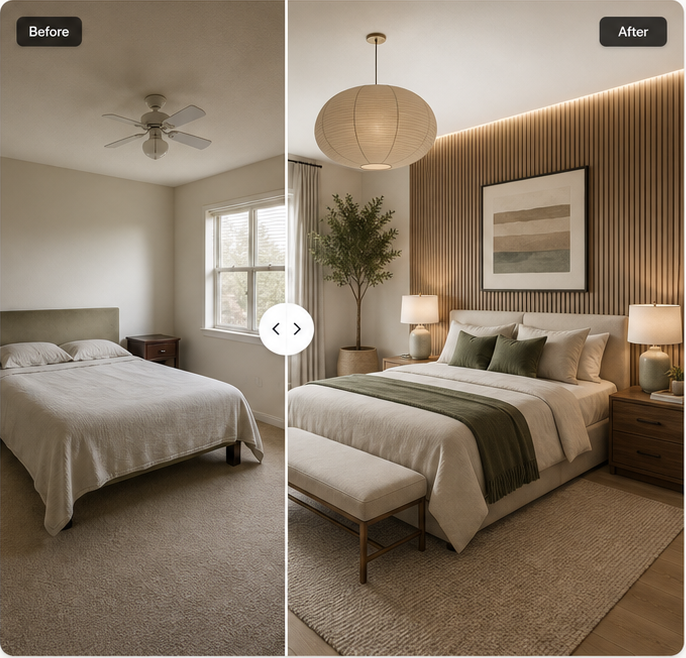
Create a Free Bedroom Design From Your Photo
A free AI bedroom design generator is most useful when it starts with the room you actually have. A text-only mood board can suggest colors or furniture, but it does not show how those ideas relate to your windows, flooring, bed position, or camera angle. Uploading a real photo gives the redesign a concrete starting point. You can then describe the mood you want, choose a style, and identify the features that should remain recognizable.
The current studio is focused on bedrooms rather than every room type. That narrower scope makes the controls easier to understand: upload a clear bedroom photo, describe the intended result, select a style, and choose which room features matter. The comparison view keeps the original and concept together so you can judge whether the direction is genuinely useful.
What You Get With the Free Plan
The planned free allowance includes two 2K images per day for a visitor. A confirmed account adds one more free 2K image per day, for three total. The allowance resets daily and does not roll over. This is enough to test a couple of distinct directions instead of spending every attempt on tiny variations of the same prompt.
Free generations are intended for concept exploration. They are not measured plans, shopping lists, or construction documents. A result can help you decide whether warm oak feels better than painted millwork or whether a darker hotel-inspired palette suits the room, but dimensions still need to be checked in the real space.
- Two free 2K bedroom concepts per day without a paid plan
- One additional daily 2K concept after confirming an account
- Before-and-after comparison and style controls in the browser
- No promise that AI output preserves every architectural detail
How to Generate a Free Bedroom Makeover
Start with a bright photo that shows the bed, surrounding walls, and at least one fixed reference such as a window or door. Avoid screenshots, heavily compressed images, fisheye distortion, and photos blocked by people or clutter close to the camera. JPG, PNG, and WebP files are accepted in the interface, with a 15 MB limit.
Write a prompt that names the desired style and the two or three changes that matter most. “Warm Japandi bedroom with a low oak bed, cream linen, and indirect lighting” is more useful than “make it beautiful.” If the existing floor, windows, or room layout must stay, keep those preserve options on. Generate the first concept, compare it with the original, and revise one important detail at a time.
Free 2K Designs vs Paid 4K Designs
A 2K concept is suitable for comparing overall composition, color, furniture scale, and lighting direction on screen. It is the sensible starting point because quick iteration matters more than maximum resolution during early exploration. Paid credits add access to 4K output for larger displays or closer visual review.
Higher resolution does not make an inaccurate layout correct. Check the room structure at 2K first. Move to 4K only after the concept has the right bed placement, window relationship, materials, and mood. The pricing page explains the current credit model without presenting a failed or blocked generation as a successful charge.
Bedroom Styles Available for Free
The studio includes Modern, Japandi, Scandinavian, Cozy, Minimalist, Luxury, Bohemian, and Mid-century directions, plus a Custom option. These labels are starting points rather than rigid templates. A Modern bedroom can be warm and textured; a Minimalist room can still use art and layered light. Use the prompt to make the selected style specific to your taste and the existing room.
If you are unsure where to begin, compare a calm neutral style with one bolder direction. For example, test Japandi against quiet luxury, or Scandinavian light against a darker mid-century palette. Two meaningfully different free concepts teach you more than two nearly identical beige rooms.
Tips for Better Free AI Bedroom Results
Keep the camera angle stable, use natural room language, and separate fixed constraints from decorative wishes. Mention what must stay before listing accessories. If the model changes a window or door, make that correction explicit in the next prompt. If it adds too much furniture, ask for clear circulation around the bed rather than simply saying “less clutter.”
Use the result to answer one design question at a time. A free bedroom concept can help you choose a palette, test a headboard wall, or compare lighting moods. It is less reliable when asked to solve storage, structure, electrical work, and furniture sourcing in a single image.
Free AI Bedroom Design Generator FAQ
Is the free AI bedroom design generator really free?+
The planned public allowance is two free 2K concepts per day. A confirmed account adds one more daily 2K concept. Paid credits are only needed for more generations or 4K output.
Do I need a credit card?+
No credit card is planned for the free daily allowance. The interface separates free access from paid credit packages.
How many free designs can I create each day?+
Visitors are planned to receive two free 2K concepts per day. Confirmed accounts receive three total per day.
What resolution is included for free?+
Free daily generations are 2K. The 4K option uses paid credits.
What happens if a generation fails?+
The planned credit ledger returns a reserved paid credit when a generation fails, is blocked, or times out. Backend verification is still required before launch.
Can I download the free result?+
The finished product is designed to let you download the generated concept from the result view. The current public interface uses an example result while production generation is completed.
Start with the bedroom you have
Upload one clear photo, describe the direction, and compare the concept with the original room.
Start a bedroom redesign