AI Bedroom Design Generator Online
Redesign a bedroom in your browser from one photo. There is no desktop software to install: upload the room, describe the direction, compare the result, and keep the ideas that fit.
Open the bedroom design studio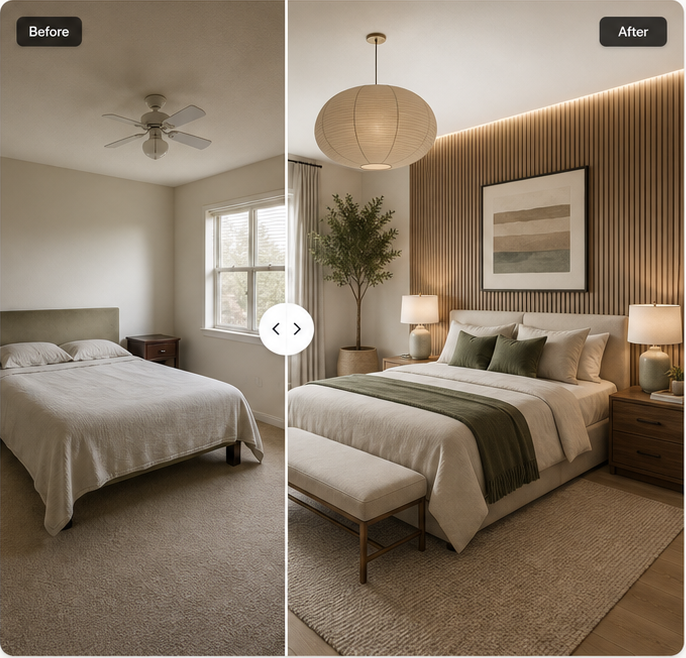
Design Your Bedroom Online From One Photo
An online AI bedroom design generator gives you a faster way to test visual decisions before moving furniture or buying materials. The photo anchors the concept in a real room. Your prompt then supplies the design intent: style, colors, materials, lighting, furniture character, and anything that should remain unchanged.
Because the workflow runs in a web browser, the starting point can be a recent phone photo or an image already saved on your computer. The useful part is not simply producing a polished bedroom picture. It is seeing the original beside the redesign so you can identify which ideas belong in your room and which ones only look good in isolation.
How the Online Bedroom Generator Works
The studio checks the image format and size, prepares the photo, interprets the room, applies the prompt and selected style, and returns a result for comparison. The visible preserve controls communicate important constraints such as keeping the room layout, windows, doors, and flooring. These controls guide the output; they cannot guarantee architectural accuracy.
A good online workflow stays editable. You should be able to change the style, rewrite the prompt, compare before and after, and try again when a concept misses the point. A single image should not be treated as the answer. Use several controlled attempts to narrow the direction.
Use It in Your Browser With No App to Install
The interface is built for current desktop and mobile browsers. You do not need to download a large design program, create a 3D model, or learn professional rendering controls. That makes it practical for early decisions such as choosing between warm and cool neutrals, testing a statement headboard, or deciding whether dark walls overwhelm the available light.
Browser-based access also makes the result easy to revisit on another screen. A laptop gives the comparison view more room, while a phone is useful for taking the starting photo and checking a saved concept in the room. The layout adapts to smaller screens without changing the core sequence.
Supported Photos, Formats, and Devices
The upload control accepts JPG, PNG, and WebP bedroom photos up to 15 MB. A shortest edge of at least 768 pixels is recommended for clearer room detail. Landscape images often make it easier to see both sides of a bed, while portrait images can work well for narrow rooms or a single focal wall.
Use an image with even light and a straightforward perspective. Extreme wide-angle lenses can make furniture scale harder to interpret. Avoid editing the room heavily before upload; the AI needs visible walls, openings, floor edges, and furniture relationships to understand the starting point.
Compare Your Original Room With the AI Design
The before-and-after slider is the most important review tool on the page. Move it across fixed features first. Check windows, doors, ceiling lines, floor direction, and the main bed position. Then review the decorative changes. A concept that looks attractive but quietly removes a door is not a practical redesign.
Comparison also helps separate transferable ideas from image-specific effects. You may like the bedding colors and wall lighting even if the generated nightstands are the wrong size. Keep the useful decisions and rewrite the prompt around the parts that need correction.
Online Bedroom Styles and Custom Prompts
Preset styles provide a shared vocabulary. Modern, Japandi, Scandinavian, Cozy, Minimalist, Luxury, Bohemian, and Mid-century each suggest different materials, shapes, and lighting. They do not replace the prompt. Add the colors you live with, the atmosphere you want at night, and any furniture you already own.
Custom prompts are especially useful when your taste crosses categories. You can ask for “Scandinavian daylight with darker walnut furniture,” or “quiet luxury without marble, brass overload, or hotel symmetry.” Concrete exclusions prevent the generator from leaning on the most obvious version of a style.
AI Bedroom Design Generator Online FAQ
Does the bedroom generator work entirely online?+
The interface runs in a web browser. Production image generation will also be initiated from the browser once the private storage and image-provider flow is enabled.
Do I need to install software?+
No desktop application is required. Open the site in a current browser and use the upload studio.
Can I use it on a phone or tablet?+
Yes. The interface has responsive layouts for phones and tablets, although a larger screen makes before-and-after comparison easier.
Which image formats can I upload?+
The studio accepts JPG, PNG, and WebP files up to 15 MB.
How long does an online generation take?+
Generation time depends on the image provider and queue. A production latency range will be published after it is measured; the interface currently avoids making an unverified speed promise.
Can I download the result from my browser?+
The result view includes a download action. The current public build downloads an example concept while the production generation backend is completed.
Start with the bedroom you have
Upload one clear photo, describe the direction, and compare the concept with the original room.
Start a bedroom redesign